Spatial instructions
Spatial instructions documentation.
A human says "turn the hood a bit clockwise". An editor needs an axis, an angle, a coordinate frame, and a promise about what must not move. This page is how one becomes the other.
It exists because the failure it prevents is silent. A raw relative-Euler edit on an attached or socketed component changes axes nobody asked about, reports success, and looks fine in the response. The mistake only surfaces in a screenshot, usually later, usually to a person.
The six-field sentence
Every spatial request normalizes to six fields. If all six are known, the transform is unambiguous.
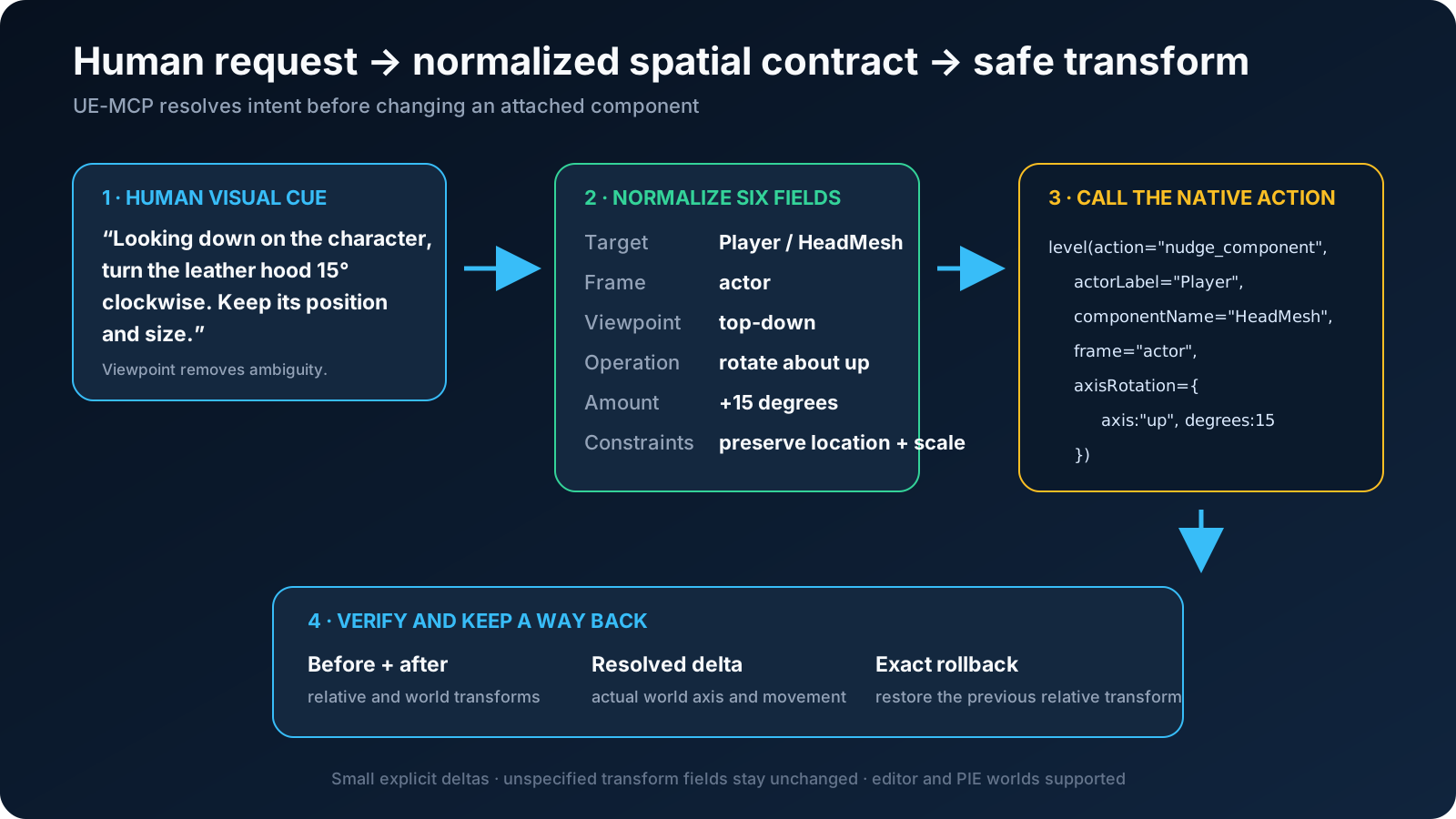
| Field | Answers | Example |
|---|---|---|
| Target | Which actor, and which component on it | Player / HeadMesh |
| Frame | Whose axes | actor |
| Viewpoint | Looking from where | looking down |
| Operation | Translate, rotate, or scale | rotate about up |
| Amount | How much, in real units | 15 degrees clockwise |
| Constraints | What must not change | preserve location and scale |
Most requests supply three or four of these and imply the rest. Infer what is obvious. Ask exactly one question when the missing field would change the result, which in practice means frame or viewpoint.
Frame: whose axes are these?
"Move forward" means the +X direction of the selected frame. The same words produce four different moves.
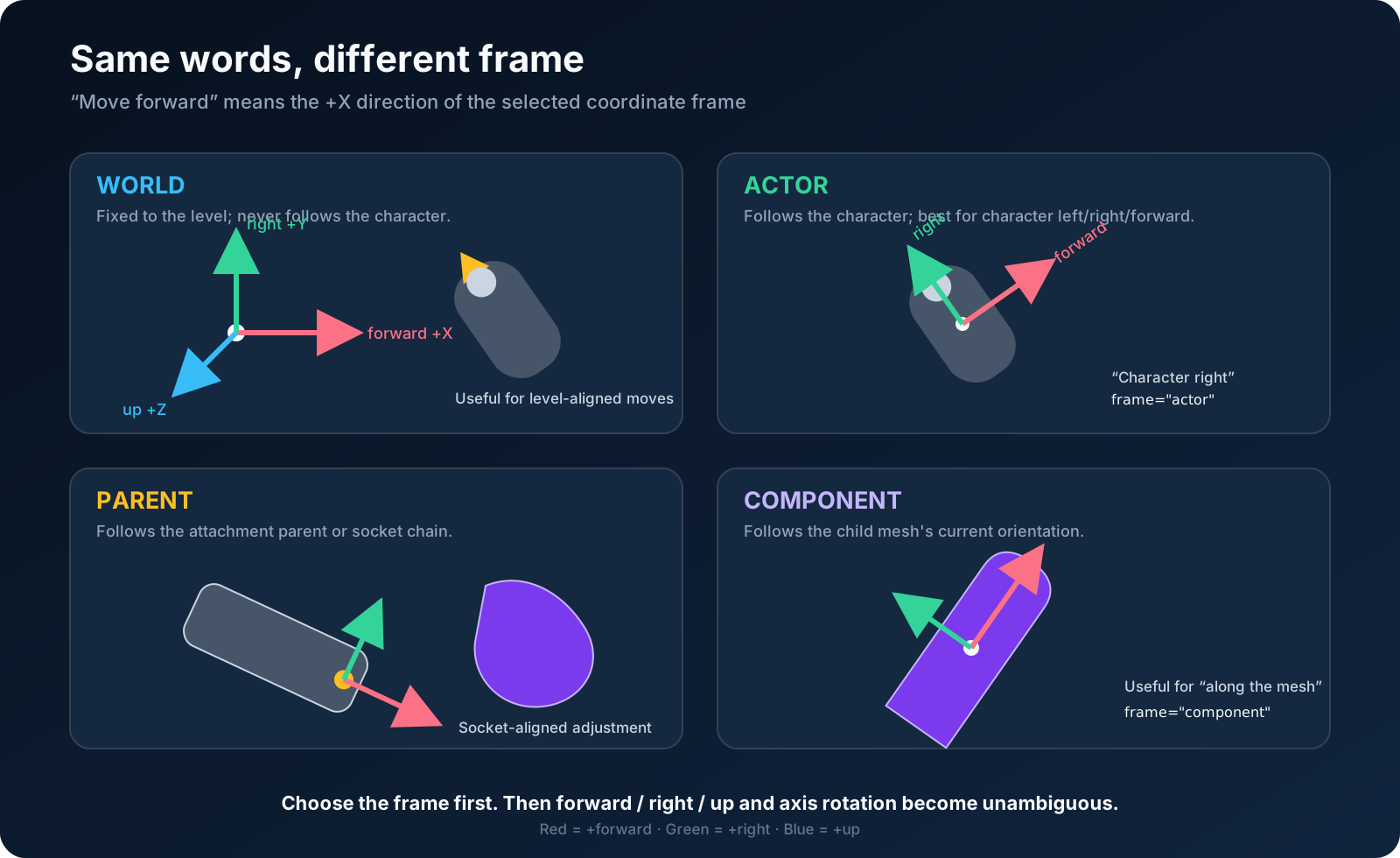
- world is fixed to the level and never follows the character. Use it for level-aligned moves: "line it up with the wall".
- actor follows the character. This is what a person means by left, right, forward and back when they are talking about a character.
- parent is the attachment parent's frame. Use it when the component should move consistently with whatever it hangs off.
- component is the component's own current orientation. Use it for "push it further along the way it is already pointing".
When a person says "the character's right", they mean frame="actor". They do
not mean the camera, even though the camera is what they are looking at.
Viewpoint: clockwise is incomplete without it
Clockwise is not a property of a rotation. It is a property of a rotation plus the side you are viewing it from. The same rotation is clockwise and counterclockwise depending on where you stand.
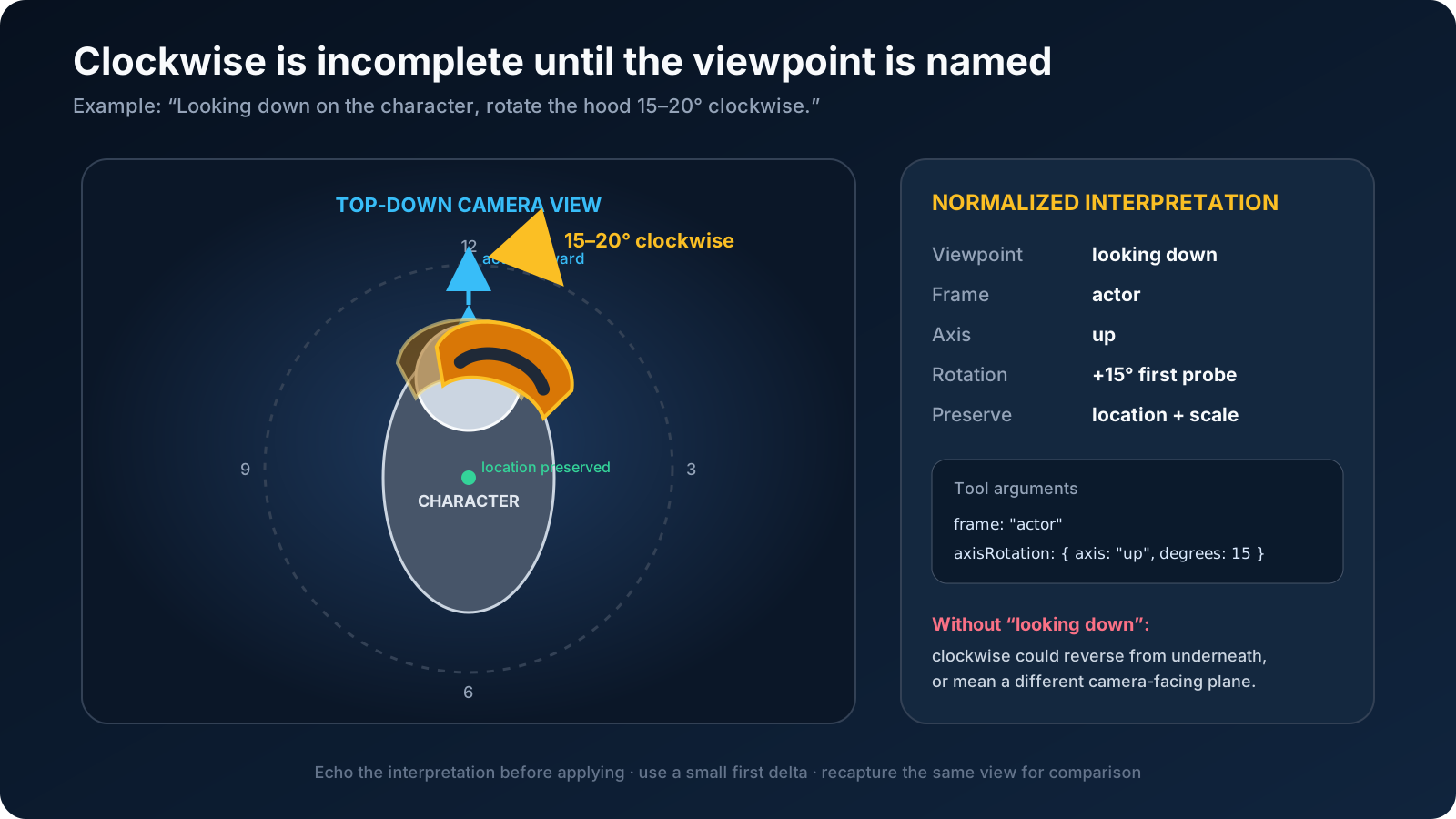
So "rotate it clockwise" is not yet an instruction. "Looking down on the character, rotate it 15 degrees clockwise" is: it names the axis (actor up) and the sign together.
If a request says clockwise without a viewpoint, that is the one question worth asking.
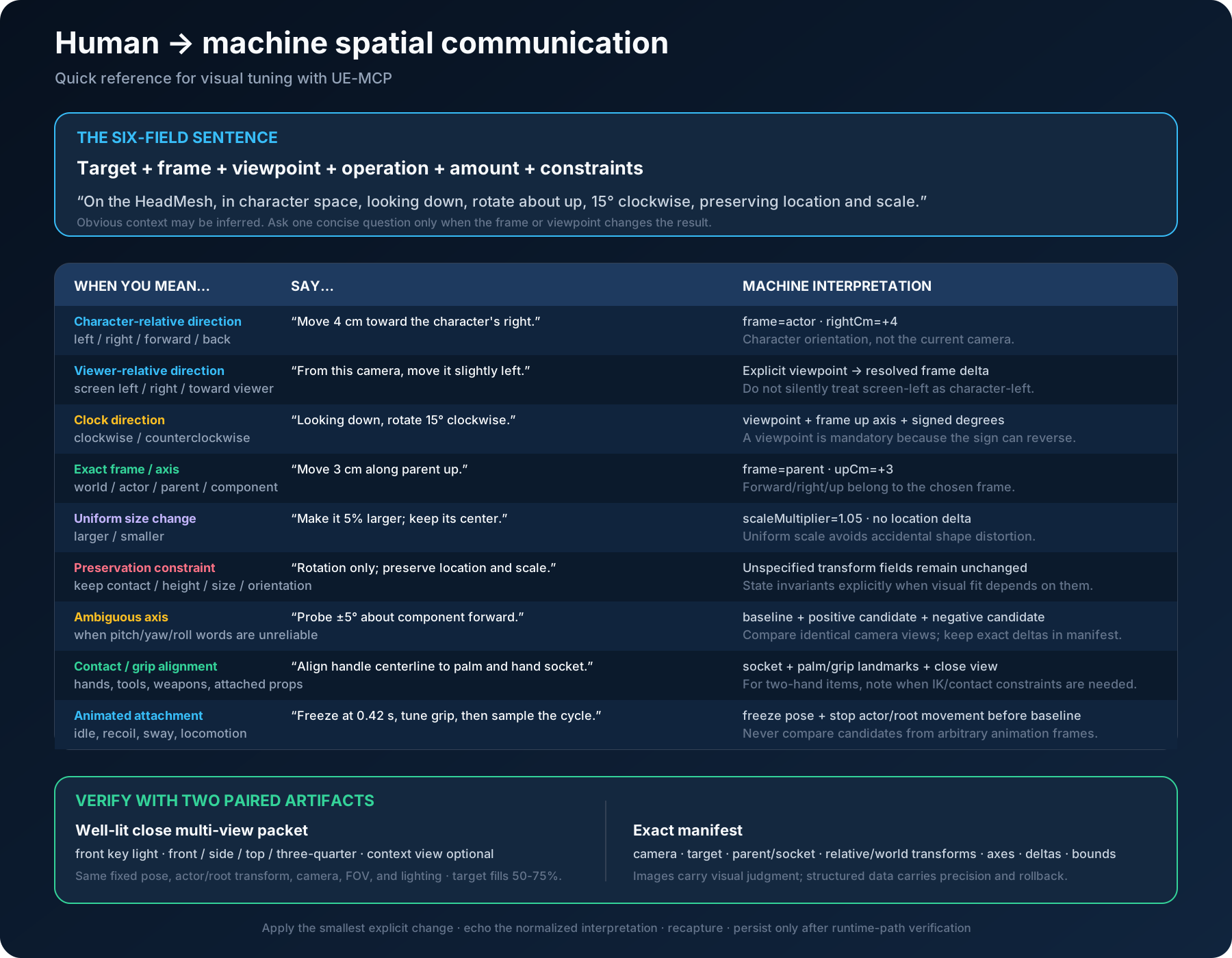
Phrase book
Doing it
level(nudge_component) takes the normalized fields directly. It composes
quaternion deltas rather than writing Euler angles, which is what keeps an
attached or socketed component from drifting on axes that were never mentioned.
level(action="nudge_component",
      actorLabel="Player",
      componentName="HeadMesh",
      frame="actor",
      viewRotation={ viewFrom: "above", direction: "clockwise", degrees: 15 },
      dryRun=true,
      world="editor")
This previews the requested inputs without moving anything. It returns the exact
component path, attachment/socket, absolute transform flags, current bounds,
relative/world transforms with quaternions, and the selected frame's world axes.
operationApplied=false means inspection or preview, never a completed edit.
Omit the deltas to use dryRun=true as a spatial inspection call.
viewFrom names the observer's side in the selected frame, looking toward
the target. It does not read or guess the player/editor camera:
| View from | Observer side | Rotation axis | Clockwise signed degrees |
|---|---|---|---|
| front | +X | forward | positive |
| back | -X | forward | negative |
| right | +Y | right | positive |
| left | -Y | right | negative |
| above | +Z | up | positive |
| below | -Z | up | negative |
Counterclockwise reverses the sign. The native tests project all twelve cases
into camera right/up axes. Under Unreal's quaternion convention a positive
angle about up carries +X toward +Y, which a viewer above reads as clockwise,
so clockwise from above is axisRotation=(axis:"up",degrees:15). Reach for
viewRotation and let the engine pick the sign.
viewRotation and signed axisRotation are mutually exclusive. Magnitudes in
viewRotation must be finite and greater than zero. frame=parent uses the
parent component's orientation; the attachment socket is reported separately.
Echo the resolved target, frame, viewpoint and amount in ordinary language.
If these agree with the user's request, make the same call with dryRun=false.
No additional confirmation is required for an already authorized edit. The
preview reports requested setter inputs, not a guaranteed final transform:
socket attachment, absolute flags, scale, physics and construction can affect
the result. Read the applied call's after transform and rollback data.
Translation is in centimetres along the frame's forward, right and up. Scale is a uniform multiplier. Rotation is an axis and an angle, never three Euler numbers.
Verifying
Keep capture_scene_png's captureMetadata beside each image. It contains the
actual camera location/rotation/basis, FOV, image dimensions, world/PIE identity,
world time, texture-loading setting and resolved focus actor/bounds. These are
measurements of this capture, not a claim that its lighting or pose was suitable.
get_viewport_state, set_viewport_exposure and hit_test_viewport_pixel refer
to the editor viewport, not this separate SceneCapture2D. Do not use the live
viewport's pixel hit test to locate a point in a headless capture.
A spatial change is only done when someone can see that it is done. Read the returned transform, and for anything a human will look at, capture an image.
Frame the capture so the contact region fills roughly half to three quarters of the shot, and take it from more than one angle: front, side, top, three-quarter. A single wide shot or a dark shot proves nothing, and accepting one is how a wrong result gets reported as a right one.
When the target is attached to a character, stop the actor and freeze the parent skeletal pose before the baseline capture, and hold both across every subsequent probe. Otherwise the pose moves between captures and the comparison measures the animation rather than the edit.
When to ask
Ask when the answer changes the transform:
- clockwise or counterclockwise with no viewpoint named
- left or right when it is genuinely unclear whether the character or the camera is the reference
- a component that is attached, where the frame decides whether the parent carries the change
Do not ask when context settles it. "Move the character's arm forward 5 cm" has a target, a frame, an operation and an amount, and the missing viewpoint does not affect a translation.